CDL 2 PORT HDMI v2.0 / USB KVM SWITCH
Regular price
£46.64 GBP
Sale price:
£46.64 GBP
Regular price:
(VAT Excl.)
Shipping calculated at checkout.
In stock, 105 units
Ports & interfaces
| USB connector type | USB Type-A, USB Type-B |
|---|---|
| HDMI version | 2.0 |
| Number of computers controlled | 2 |
| Keyboard port type | USB |
| Mouse port type | USB |
| Video port type | HDMI |
| Audio connections | Yes |
| Headphone outputs | 1 |
| HDMI ports quantity | 3 |
| DC-in jack | Yes |
| HDCP | Yes |
Network
| Ethernet LAN | No |
|---|
Performance
| HD type | 4K Ultra HD |
|---|---|
| Plug and Play | Yes |
| Maximum resolution | 4096 x 2160 pixels |
| Automatic switching | Yes |
Technical details
| Product colour | Black |
|---|---|
| LED indicators | Yes |
Power
| Power source | DC |
|---|---|
| Input voltage | 5 V |
System requirements
| Windows operating systems supported | Yes |
|---|---|
| Mac operating systems supported | Yes |
Packaging content
| Cables included | HDMI, USB Type-A to USB Type-B |
|---|---|
| AC adapter included | Yes |

CDL 2 PORT HDMI v2.0 / USB KVM SWITCH
Regular price
£46.64 GBP
Sale price:
£46.64 GBP
Regular price:
(VAT Excl.)
Overview
KVM switches allow you to control multiple computers from one keyboard, video monitor and mouse. The KVM supports USB mice, keyboards and HDMI displays.Installation is simple1. Connect computers to USB ports with a USB type A to type B cable to the KVM2. Connect HDMI cables to the displays and KVM3. Connect USB keyboard and mouse to the relevant ports on the back of KVM4. The front USB port can be used for other USB devices You can switch between computers via buttons, keyboard hotkeys or auto scan.Please note: Cables are included.

Express next day
delivery for only £9*

Enjoy interest for 4 months
on purchases over £99

Never beaten on price with the
Xinix Price Match Promise
{"navigation": {
"nextEl": "#shopify-section-template--27292148760954__product_recommendations_RNM4nw .tab-content[data-index='2'] .swiper-button-next",
"prevEl": "#shopify-section-template--27292148760954__product_recommendations_RNM4nw .tab-content[data-index='2'] .swiper-button-prev"
},"spaceBetween": 12,
"slidesPerView": 5,
"breakpoints": {
"240": {
"slidesPerView": 1.3
},
"992": {
"slidesPerView": 5
}
}
}


Best Seller

Vendor:
Algo
Algo 8189 SIP Surface Mount Ceiling Speaker
Regular price
£444.53 GBP
Sale price:
£444.53 GBP
Regular price:
(VAT Excl.)
In stock
Best Seller

Vendor:
Cablenet
CNL 1.5M C14-C13 Bk PVC 0.75MM
Regular price
£1.28 GBP
Sale price:
£1.28 GBP
Regular price:
(VAT Excl.)
In stock

Vendor:
EPOS
EPOS EXPAND 40T Bluetooth Speaker - TEAMS
Regular price
£175.00 GBP
Sale price:
£175.00 GBP
Regular price:
(VAT Excl.)
In stock

Vendor:
EPOS
EPOS IMPACT 860T WIRED HEADSET
Regular price
£90.17 GBP
Sale price:
£90.17 GBP
Regular price:
(VAT Excl.)
In stock
Best Seller
Out of Stock

Vendor:
Cablenet
EZ-Path Grommet 25MM
Regular price
£13.43 GBP
Sale price:
£13.43 GBP
Regular price:
(VAT Excl.)
Best Seller
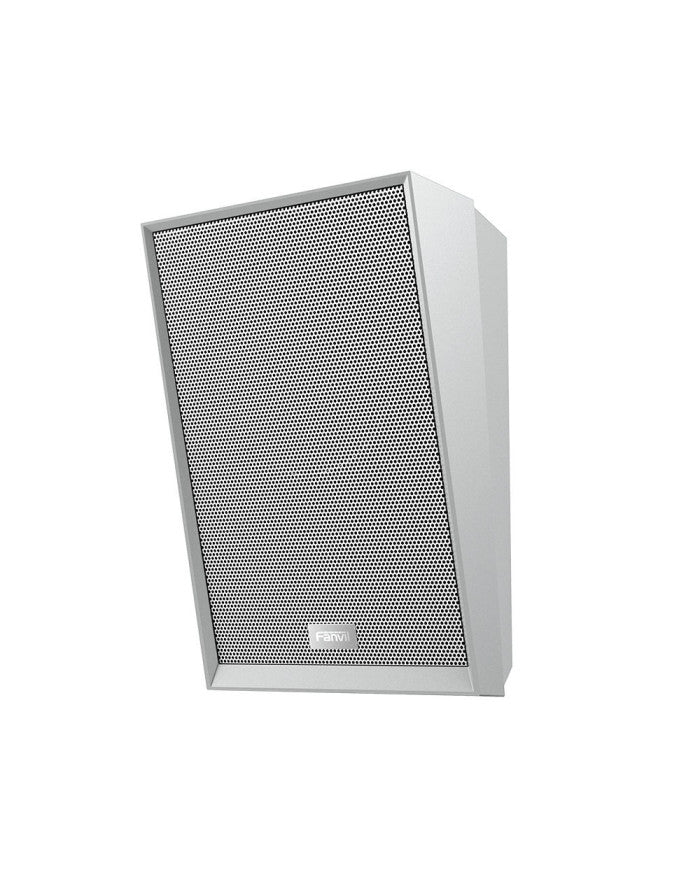
Vendor:
Fanvil
Fanvil A212 SIP Speaker White
Regular price
£118.33 GBP
Sale price:
£118.33 GBP
Regular price:
(VAT Excl.)
In stock
Best Seller

Vendor:
Fanvil
Fanvil i16S
Regular price
£117.50 GBP
Sale price:
£117.50 GBP
Regular price:
(VAT Excl.)
In stock
Best Seller

Vendor:
Fanvil
Fanvil KT20
Regular price
£10.95 GBP
Sale price:
£10.95 GBP
Regular price:
(VAT Excl.)
In stock
{"navigation": {
"nextEl": "#shopify-section-template--27292148760954__product_recommendations_RNM4nw .tab-content[data-index='3'] .swiper-button-next",
"prevEl": "#shopify-section-template--27292148760954__product_recommendations_RNM4nw .tab-content[data-index='3'] .swiper-button-prev"
},"spaceBetween": 12,
"slidesPerView": 5,
"breakpoints": {
"240": {
"slidesPerView": 1.3
},
"992": {
"slidesPerView": 5
}
}
}


Vendor:
Star Micronics
Star Micronics TSP143IV UE BK E+U PRINTER THERMAL 80MM WIDE PAPER 24VDC, Direct thermal, POS printer, 203 x 203 DPI, 250 mm/sec, Wired & Wireless, USB Type-C
Regular price
£206.99 GBP
Sale price:
£206.99 GBP
Regular price:
(VAT Excl.)
In stock

Vendor:
Star Micronics
Star Micronics Star TSP143IIIU
Regular price
£144.42 GBP
Sale price:
£144.42 GBP
Regular price:
(VAT Excl.)
In stock
Out of Stock

Vendor:
SEAGATE
SEAGATE SKYHAWK 3.5 3TB HDD RECERTIFIED
Regular price
£83.50 GBP
Sale price:
£83.50 GBP
Regular price:
(VAT Excl.)

Vendor:
CORSAIR
CORSAIR FRAME 5000D RS Mid-Tower PC Case – Black
Regular price
£110.73 GBP
Sale price:
£110.73 GBP
Regular price:
(VAT Excl.)
In stock

Vendor:
Yealink
YEALINK MCORE4-MS COMPUTER
Regular price
£1,245.27 GBP
Sale price:
£1,245.27 GBP
Regular price:
(VAT Excl.)
In stock

Vendor:
LENOVO
LENOVO FHD WEBCAM
Regular price
£18.93 GBP
Sale price:
£18.93 GBP
Regular price:
(VAT Excl.)
In stock

Vendor:
ASUS
ASUS AM5 ROG CROSSHAIR X870E HERO BTF
Regular price
£458.00 GBP
Sale price:
£458.00 GBP
Regular price:
(VAT Excl.)
In stock

Vendor:
ASUS
ASUS RX 9070 XT 16GB PRIME OC WHITE
Regular price
£920.83 GBP
Sale price:
£920.83 GBP
Regular price:
(VAT Excl.)
In stock
Shop by Brand
{
"loop": true,
"autoplay": {
"delay": 5000,
"disableOnInteraction": false,
"pauseOnMouseEnter": true
},
"speed": 1300.0,
"spaceBetween": 16,
"navigation": {
"nextEl": "#shopify-section-template--27292148760954__brand_image_8dgTTL .swiper-button-next",
"prevEl": "#shopify-section-template--27292148760954__brand_image_8dgTTL .swiper-button-prev"
},
"slidesPerView": 1,
"breakpoints": {
"240": {
"slidesPerView": 3,
"spaceBetween": 10
},
"768": {
"slidesPerView": 5
},
"992": {
"slidesPerView": 7
},
"1300": {
"slidesPerView": 8
}
}
}